

Carnage | Tryhackme Walkthough
analyze PCAP using Wireshark.

Task 1 Scenario
Eric Fischer from the Purchasing Department at Bartell Ltd has received an email from a known contact with a Word document attachment. Upon opening the document, he accidentally clicked on "Enable Content." The SOC Department immediately received an alert from the endpoint agent that Eric's workstation was making suspicious connections outbound. The pcap was retrieved from the network sensor and handed to you for analysis.
Task: Investigate the packet capture and uncover the malicious activities.
Credit goes to Brad Duncan for capturing the traffic and sharing the pcap packet capture with InfoSec community.
NOTE: DO NOT directly interact with any domains and IP addresses in this challenge.
Task 2 Traffic Analysis
Are you ready for the journey?
Please, load the pcap file in your Analysis folder on the Desktop into Wireshark to answer the questions below.
Using Statistics → Capture File Properties, I confirmed:
Capture duration: ~21 minutes
Total packets: ~70,873
Hash values match the expected file
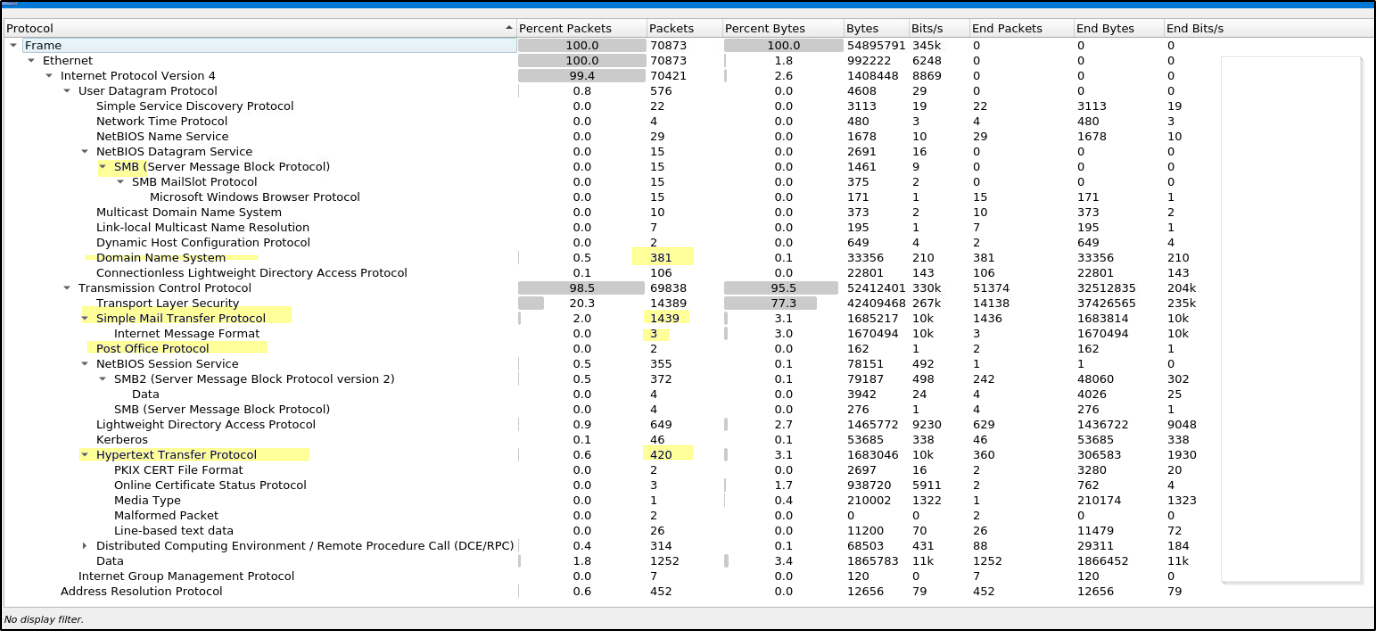
Next, I checked Statistics → Protocol Hierarchy to understand the types of traffic present. The main protocols observed were: DNS, HTTP, SMTP, SMB and more
Since HTTP is commonly abused by attackers for payload delivery and command-and-control, I began my investigation with HTTP traffic.
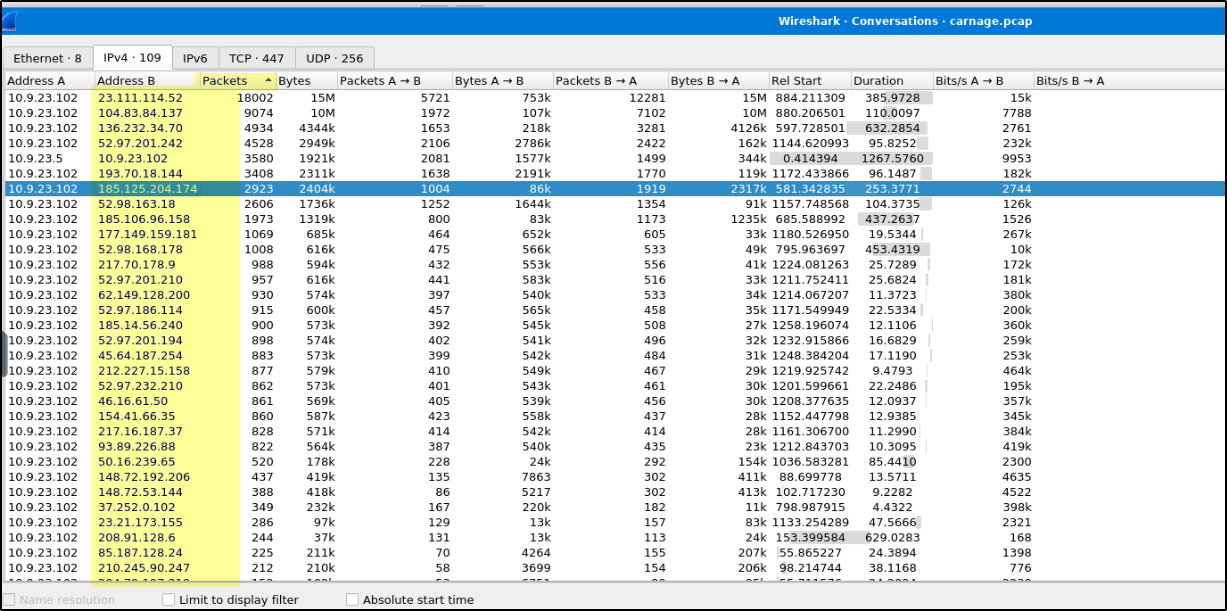
Using Statistics → Conversations, I identified the internal host 10.9.23.102 communicating with many external IP addresses. I sorted conversations by packet count to quickly spot suspicious and high-volume connections.
Useful Shortcuts
Ctrl + Alt + 7 → Change time display format
Ctrl + Shift + I → Add selected field as a column
Answer the questions below
- What was the date and time for the first HTTP connection to the malicious IP?
(answer format: yyyy-mm-dd hh:mm:ss)
Ans: 2021-09-24 16:44:38
To identify the first HTTP connection to the malicious IP, I enabled the time column in Wireshark using Ctrl + Alt + 7 and applied the
httpdisplay filter.
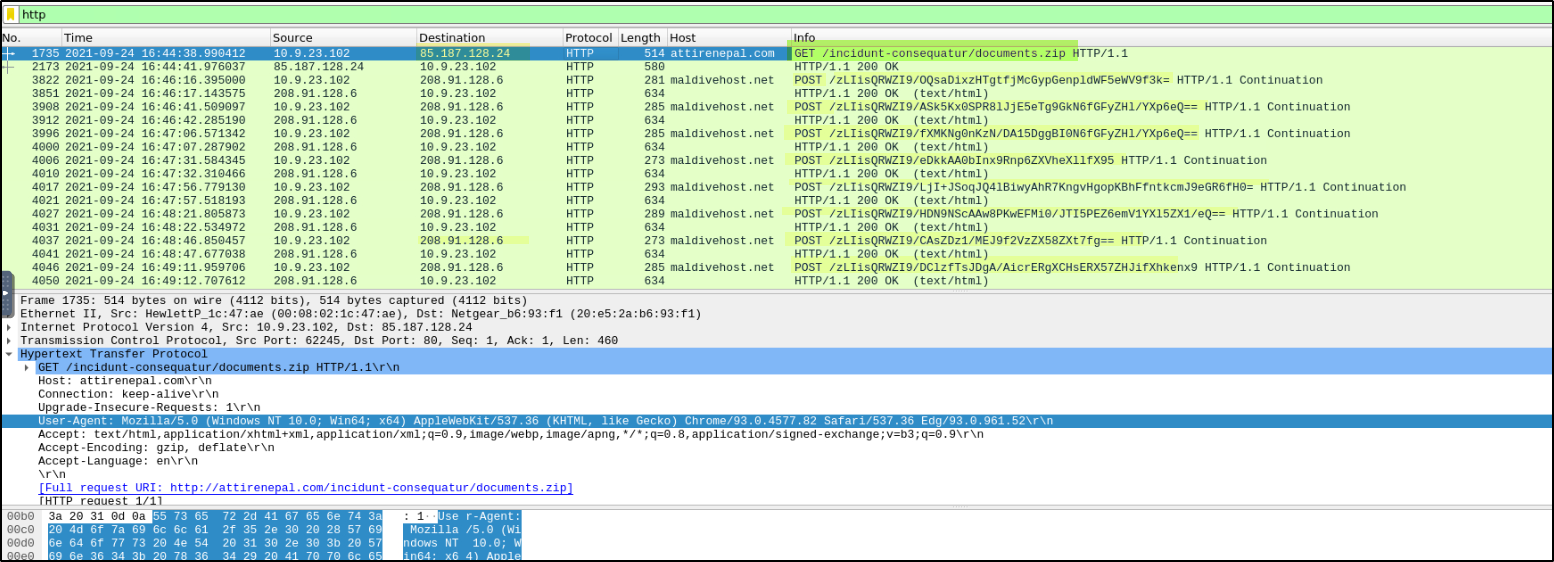
Then select the earliest HTTP GET request and followed the HTTP stream.
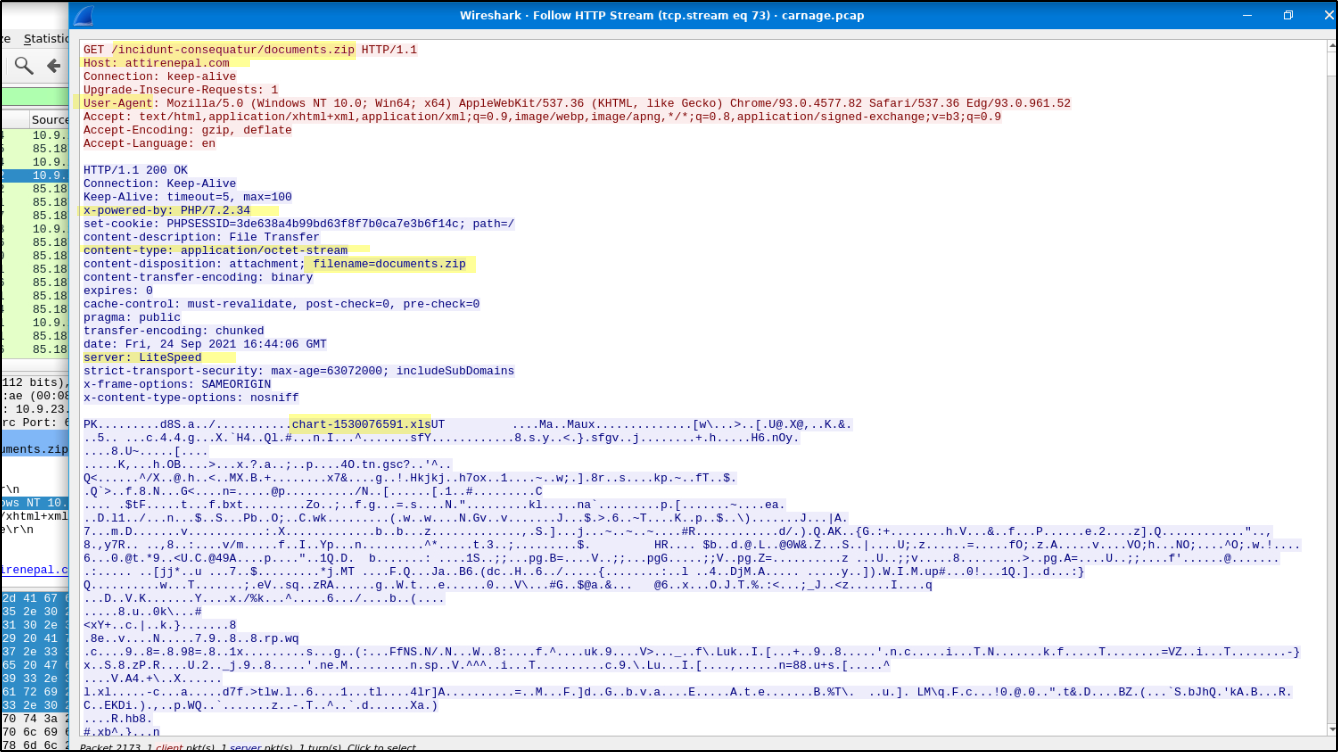
While reviewing the stream, I observed a request for
documents.zipfrom the domainattirenepal.com. The HTTP response confirmed that the server was runningLiteSpeedwithPHP/7.2.34.Additionally, the response data revealed that the actual file name being delivered was
chart-1530076591.xls, indicating a disguised malicious payload.
- What is the name of the zip file that was downloaded?
documents.zip
- What was the domain hosting the malicious zip file?
attirenepal.com
- Without downloading the file, what is the name of the file in the zip file?
chart-1530076591.xls
- What is the name of the webserver of the malicious IP from which the zip file was downloaded?
LiteSpeed
- What is the version of the webserver from the previous question?
PHP/7.2.34
- Malicious files were downloaded to the victim host from multiple domains. What were the three domains involved with this activity?
Ans: finejewels.com.au, thietbiagt.com, new.americold.com
Hint : Check HTTPS traffic.
Narrow down the timeframe from 16:45:11 to 16:45:30.
Since HTTPS traffic is encrypted, there are no visible file names or URLs in plain text, and most packets appear only as Client Hello, Server Hello, and Application Data.
I applied the following filter to view only TLS within the given timeframe:
tls && frame.time >= "2021-09-24 16:45:11" && frame.time <= "2021-09-24 16:45:30"
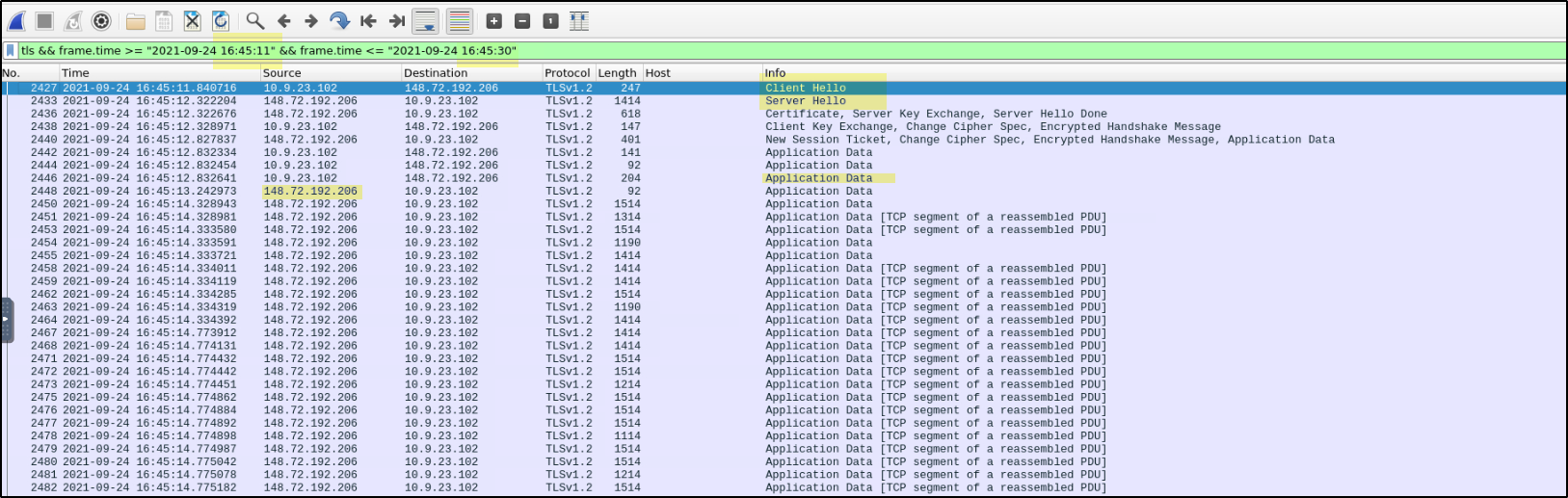
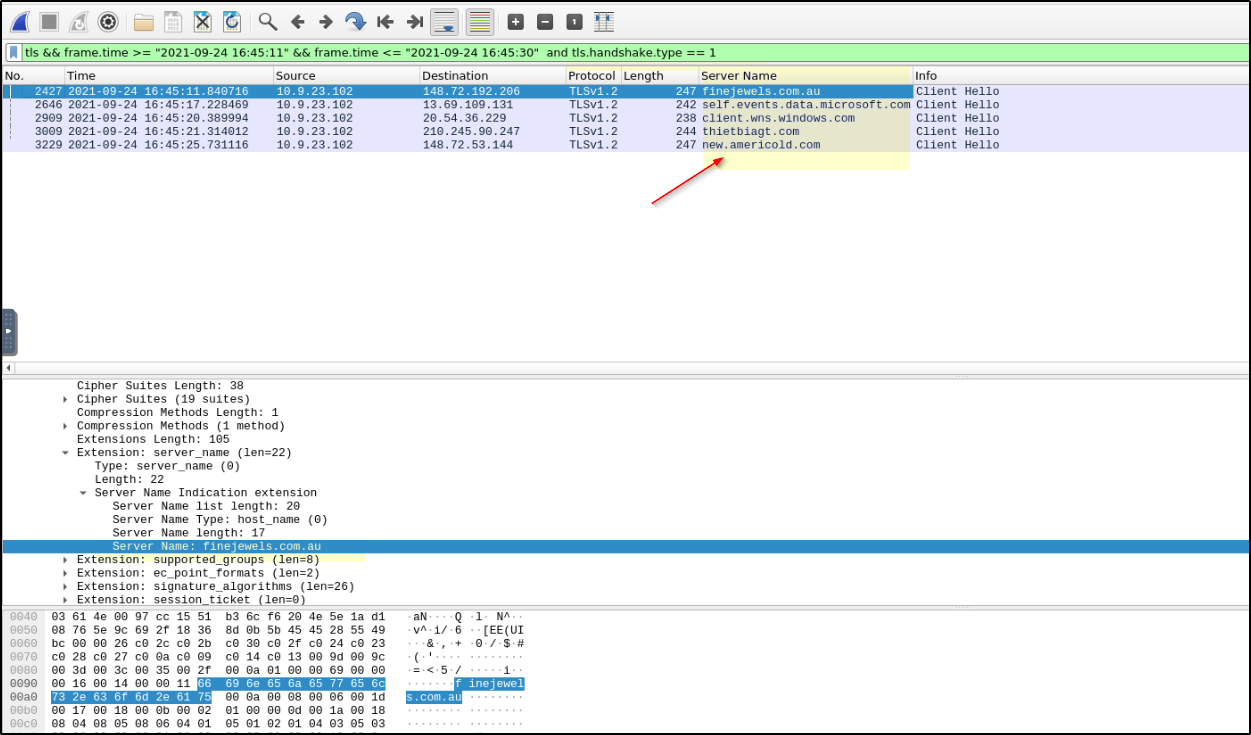
Add && tls.handshake.type == 1 to the filter - to view Client Hello packets.
The Client Hello message is important because it contains the Server Name Indication (SNI) field, which reveals the domain name that the client is attempting to connect to.
I added the field Server Name as a column to easily view the domains
From these Client Hello packets, I extracted three unique domains that were contacted during the malicious download activity.
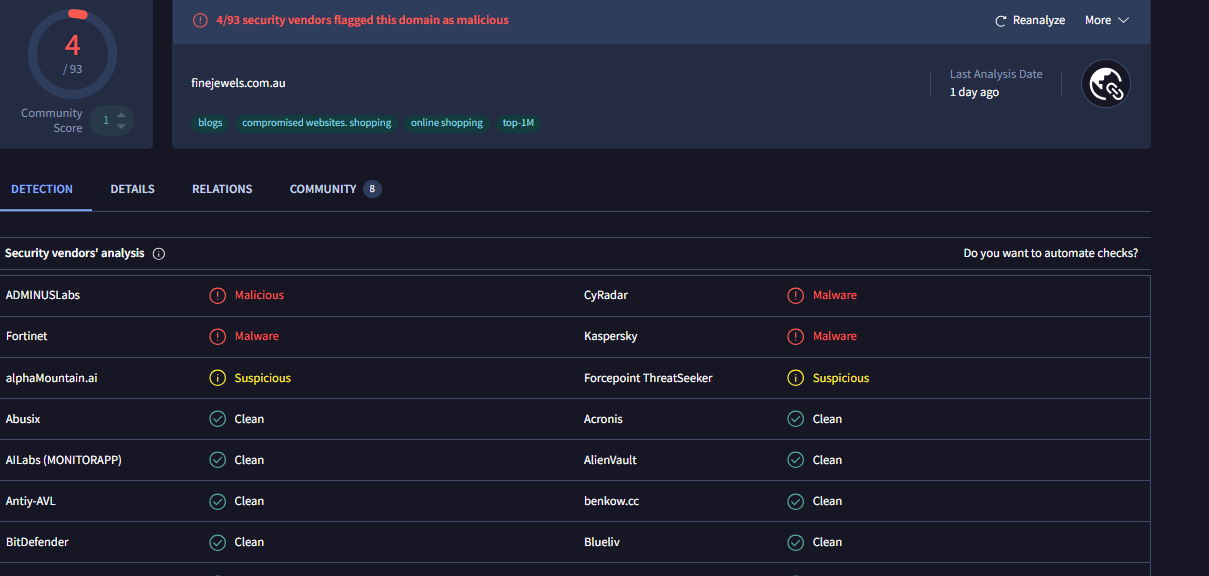
I checked the domains on VirusTotal, and only inejewels.com.au, thietbiagt.com, and new.americold.com were flagged as malicious.
- Which certificate authority(CA) issued the SSL certificate to the first domain from the previous question?
Ans: GoDaddy
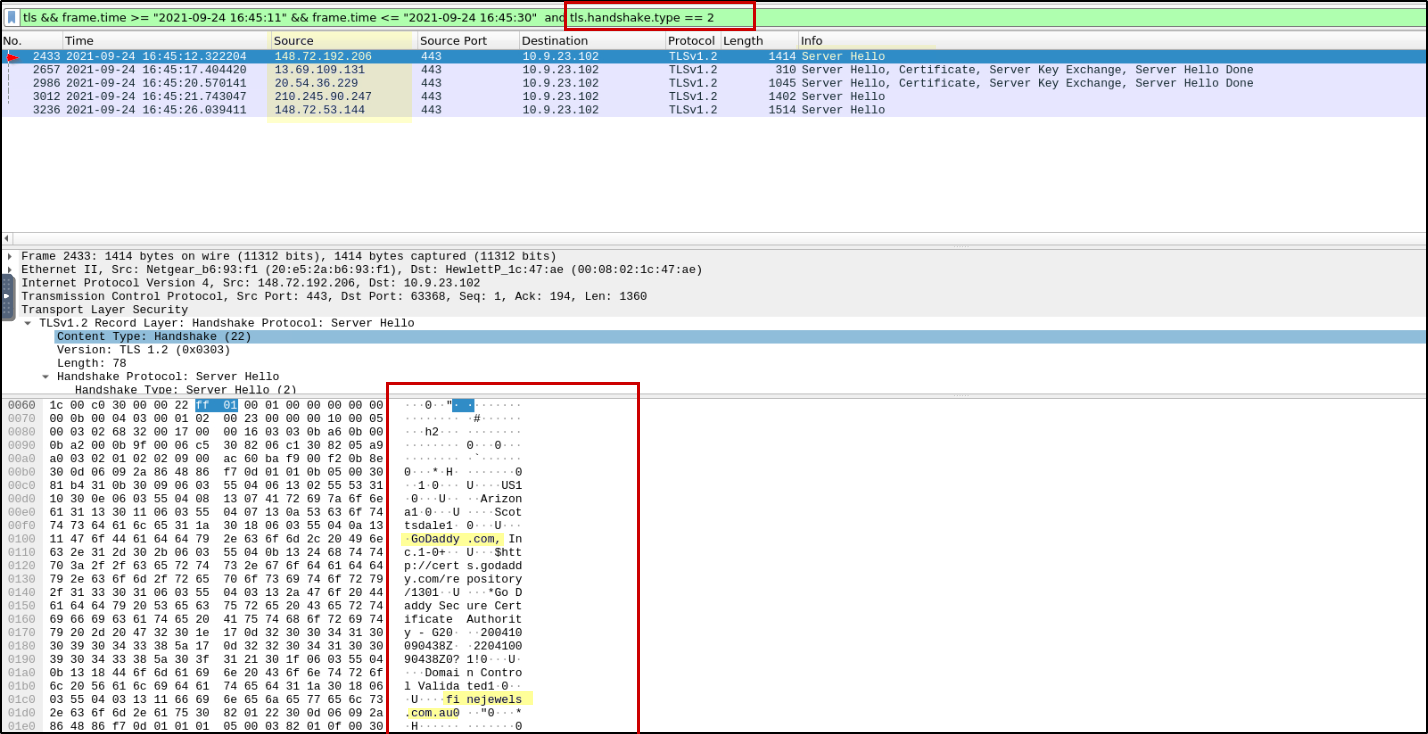
Add this to above filter to view Server Hello packets: tls.handshake.type == 2
The Server Hello message shows details about the negotiated TLS session and is followed by the Certificate message, which contains information about the issuer of the certificate.
By inspecting the certificate details in the packet ASCII text, I identified the issuing Certificate Authorities as follows: finejewels.com – GoDaddy, thietbiagt.com – Let’s Encrypt, and new.americold.com – cPanel, Inc.
- What are the two IP addresses of the Cobalt Strike servers? Use VirusTotal (the Community tab) to confirm if IPs are identified as Cobalt Strike C2 servers. (answer format: enter the IP addresses in sequential order)
Ans: 185.106.96.158, 185.125.204.174
Just like we did above, I went to Conversations to view all IPs contacted by the internal host. Then I manually looked up each external IP on threat intelligence platforms.
it is easier when you already know which IPs are normal daily traffic and which look suspicious.
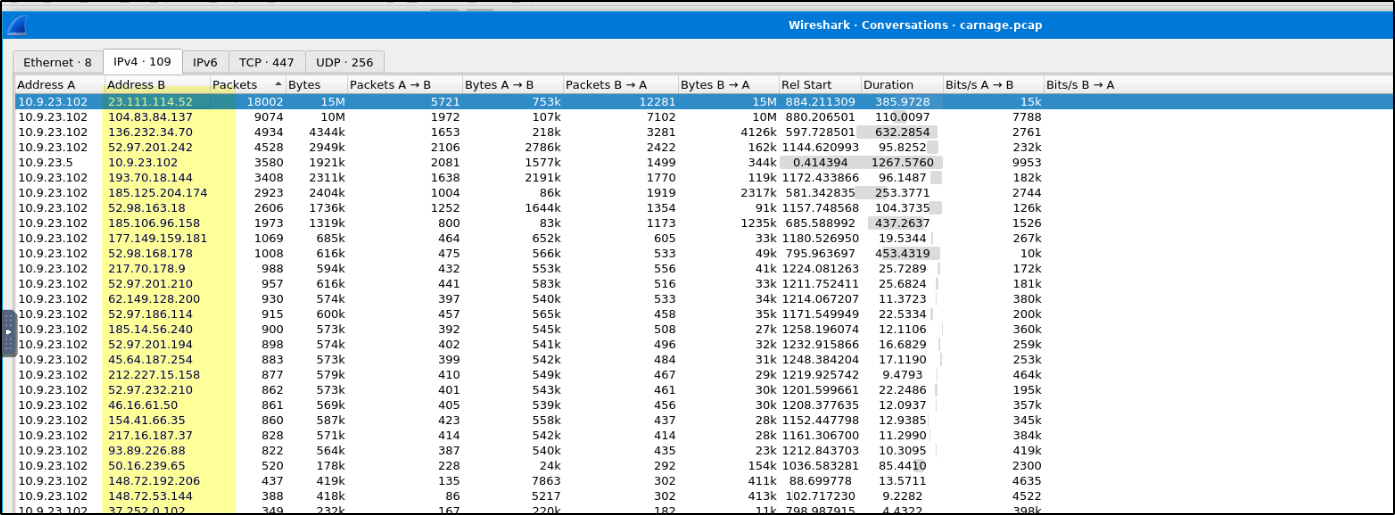
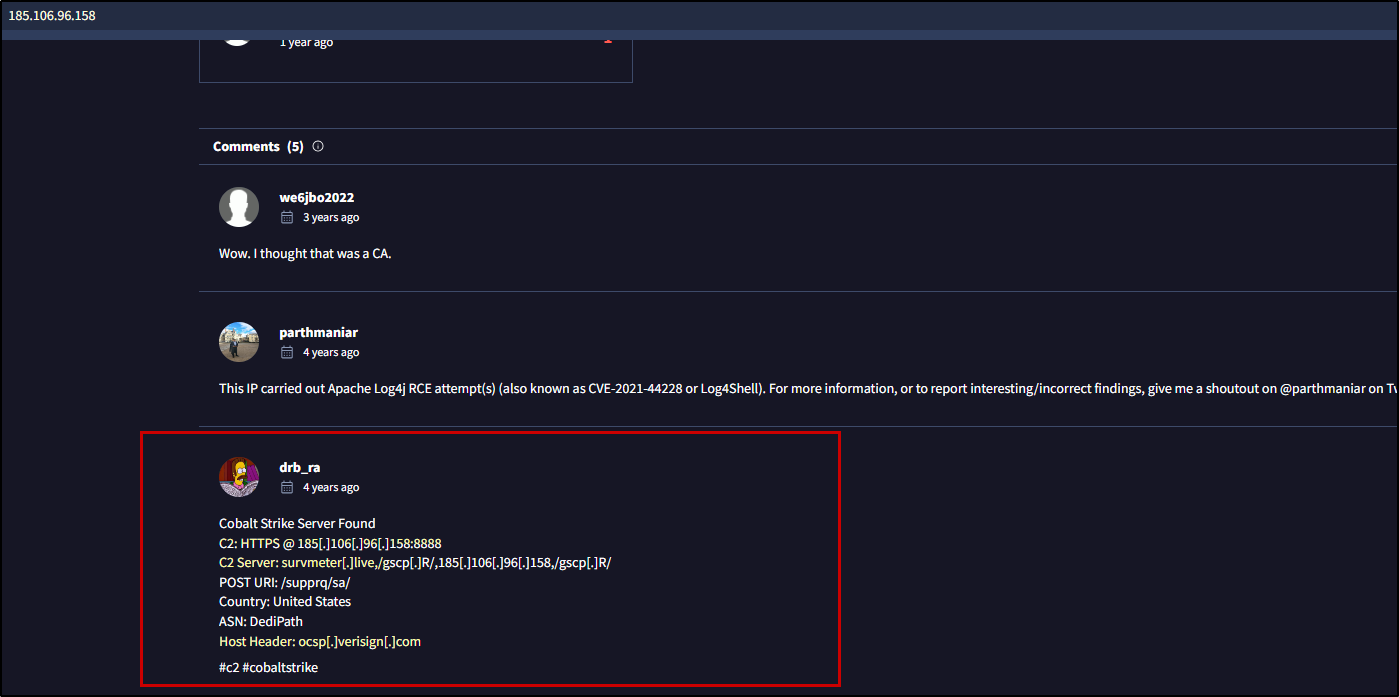
From the lookup, two IPs were identified as Cobalt Strike C2 servers based on the Community tab
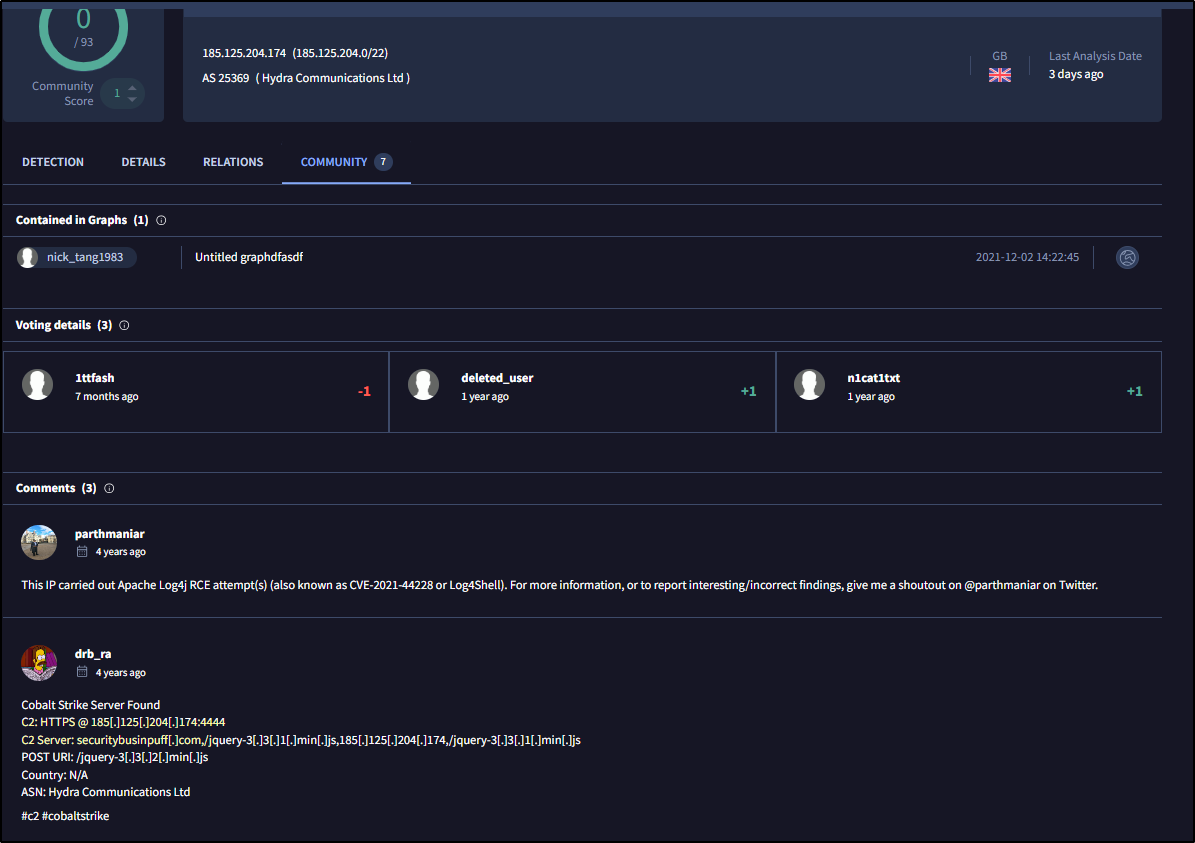
For the second IP, even though it was not flagged as malicious, under the Community tab it was reported as related to Cobalt Strike activity.
- What is the Host header for the first Cobalt Strike IP address from the previous question?
Ans: ocsp.verisign.com
I checked the HTTP traffic in Wireshark and viewed the Host header to identify the domain
- What is the domain name for the first IP address of the Cobalt Strike server? You may use VirusTotal to confirm if it's the Cobalt Strike server (check the Community tab).
Ans: survmeter.live
You can see the answer in the screenshot I shared for the 9th question.
- What is the domain name of the second Cobalt Strike server IP? You may use VirusTotal to confirm if it's the Cobalt Strike server (check the Community tab).
Ans: securitybusinpuff.com
You can see the answer in the screenshots I shared above for the 9th question.
- What is the domain name of the post-infection traffic?
Ans: maldivehost.net
I filtered HTTP traffic with the internal host and both GET and POST methods.
While reviewing the traffic, I noticed continuous HTTP requests with long encoded strings being sent to the IP 185.106.96.158 using the domain oscp.verisign.com.
This repetitive pattern indicates C2 beaconing behavior, which matches Cobalt Strike activity.
These requests are used for beaconing, where the malware checks if there are new commands to execute.
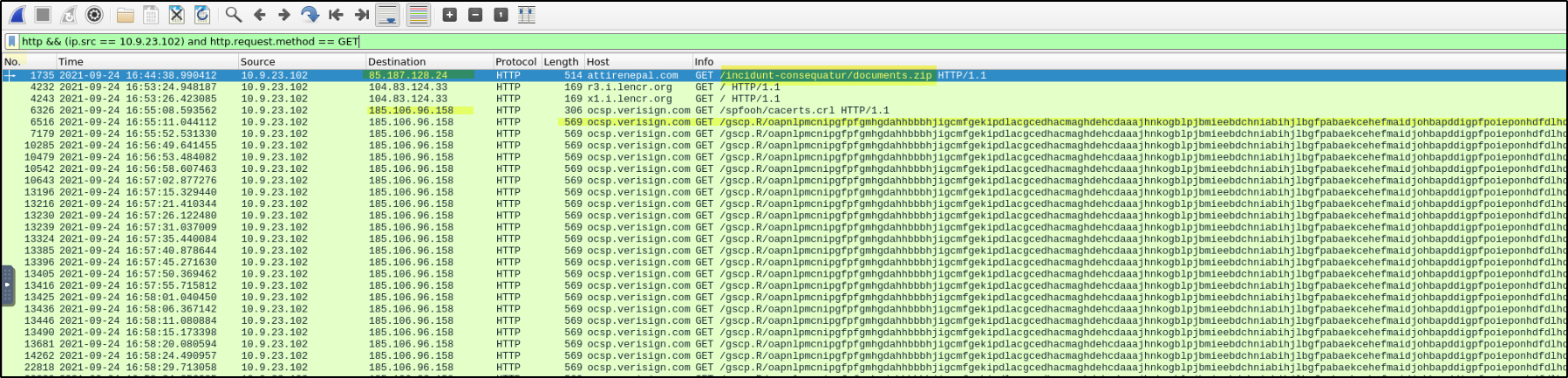
When analyzing the POST requests, I observed that two domains were involved:
maldivehost.net and oscp.verisign.com
The POST requests show the infected system sending data back to the attacker’s server.
This data can include system information or command execution results.
Such behavior indicates possible data exfiltration or active C2 communication.
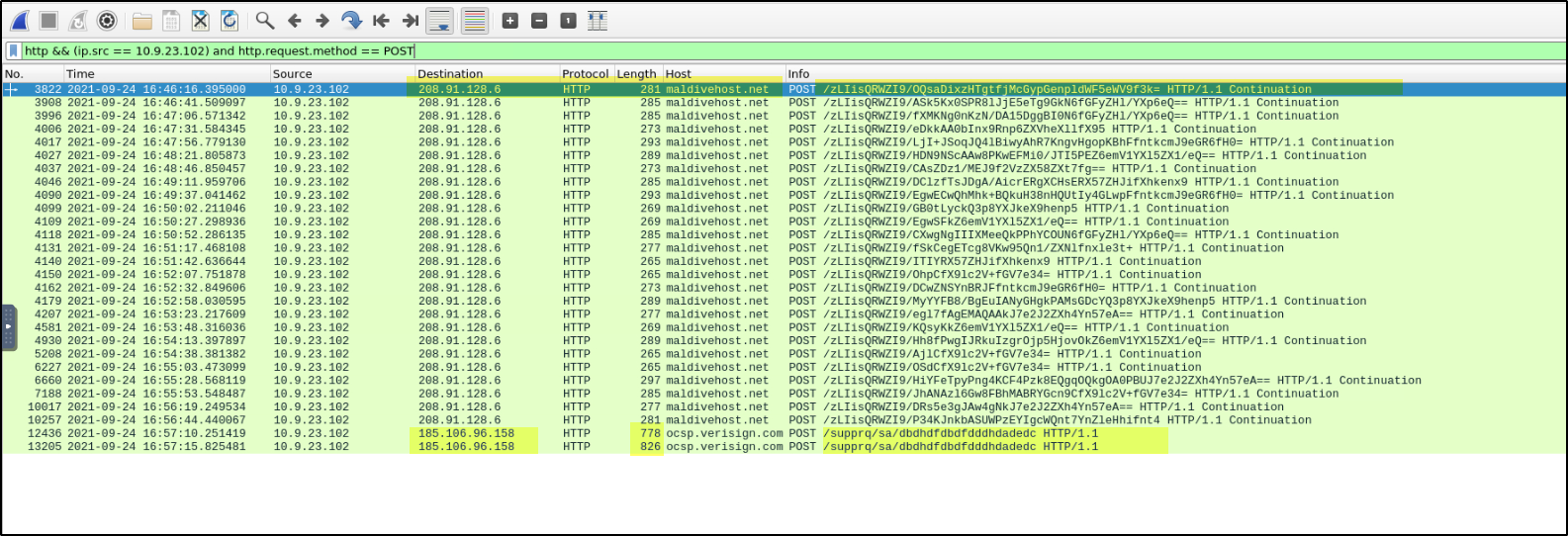
For example, I followed the HTTP stream of the POST request to maldivehost.net and observed long encoded data inside the HTTP request body, indicating data being sent to the attacker.
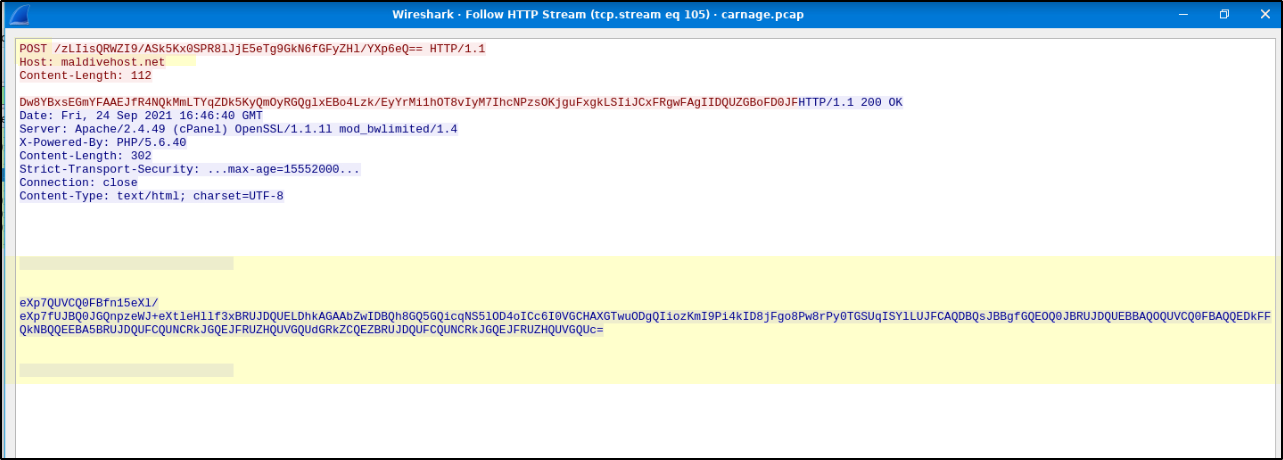
POST request to oscp.verisign.com, where the server responded with HTTP/1.1 200 OK and a keep-alive connection, showing successful C2 communication even though no extra visible data was returned.
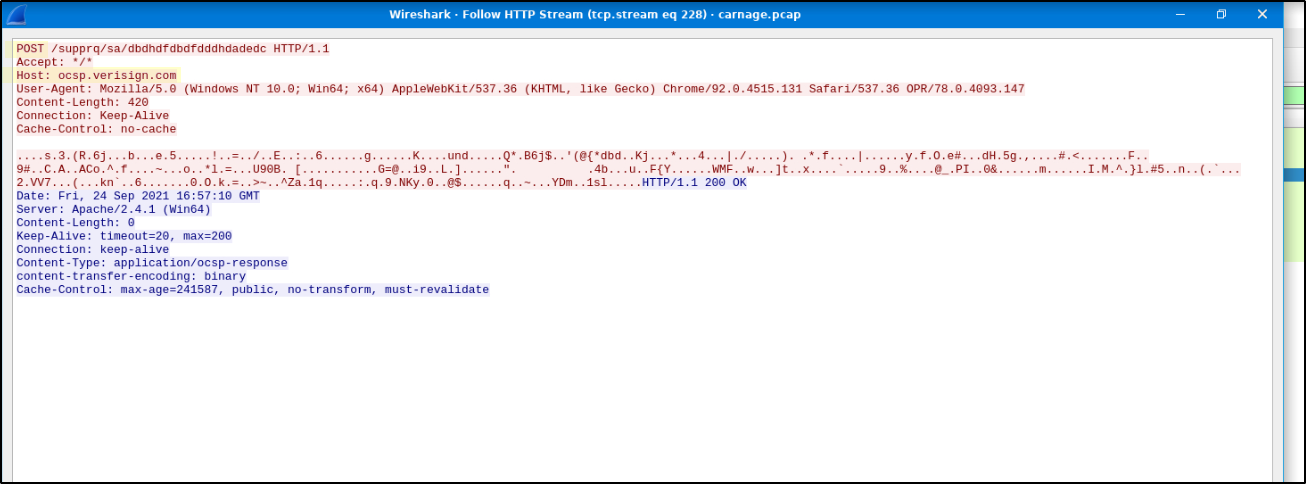
- What are the first eleven characters that the victim host sends out to the malicious domain involved in the post-infection traffic?
zLIisQRWZI9
You can see these details in the screenshot provided in the 13th question.
- What was the length for the first packet sent out to the C2 server?
281
You can see these details in the screenshot provided in the 13th question.
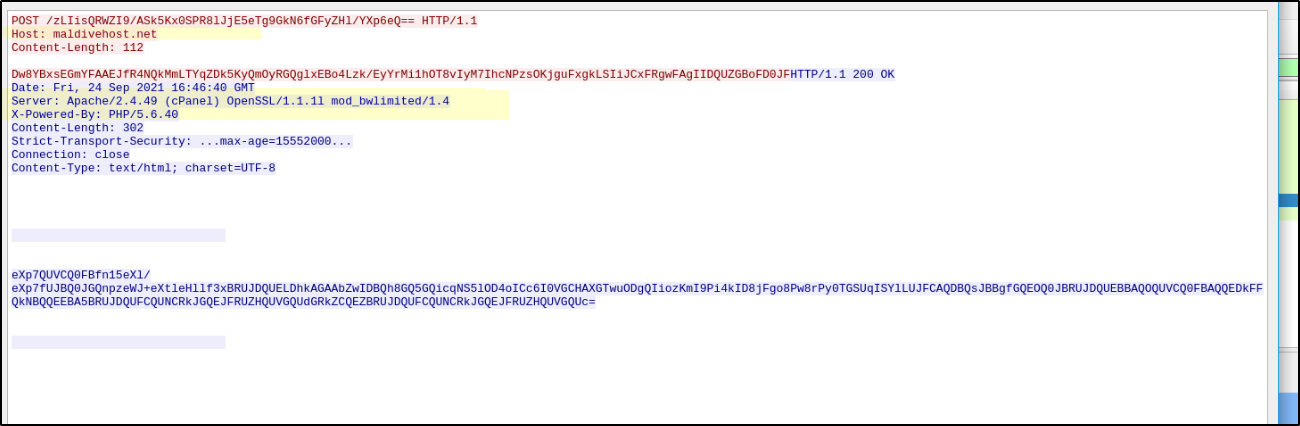
- What was the Server header for the malicious domain from the previous question?
Apache/2.4.49 (cPanel) OpenSSL/1.1.1l mod_bwlimited/1.4
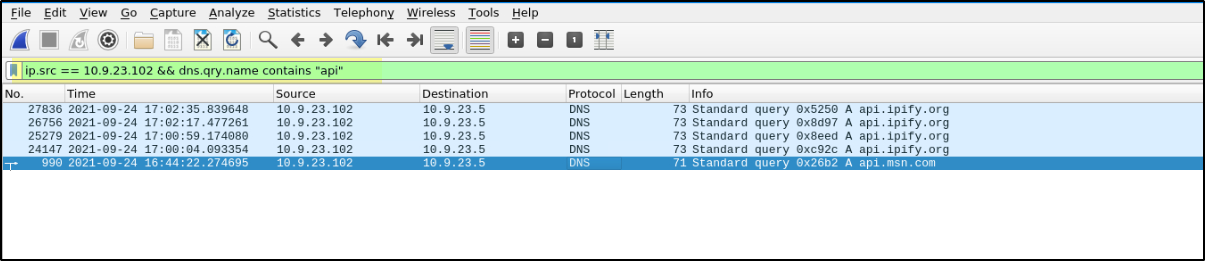
- The malware used an API to check for the IP address of the victim’s machine. What was the date and time when the DNS query for the IP check domain occurred? (answer format: yyyy-mm-dd hh:mm:ss UTC)
Ans: 2021-09-24 17:00:04
The malware checked the victim’s public IP by using an API service. With the help of ChatGPT, I used the filter ip.src == 10.9.23.102 && dns.qry.name contains "api" and found that the victim made a DNS query to api.ipify.org.
- What was the domain in the DNS query from the previous question?
Ans: api.ipify.org
- Looks like there was some malicious spam (malspam) activity going on. What was the first MAIL FROM address observed in the traffic?
Ans: farshin@mailfa.com
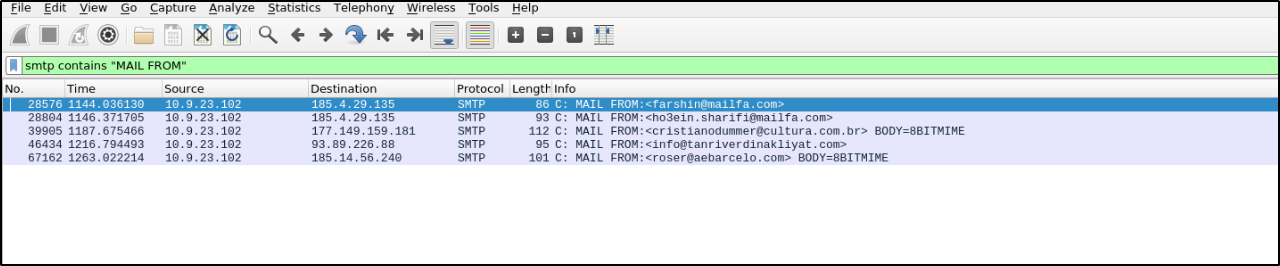
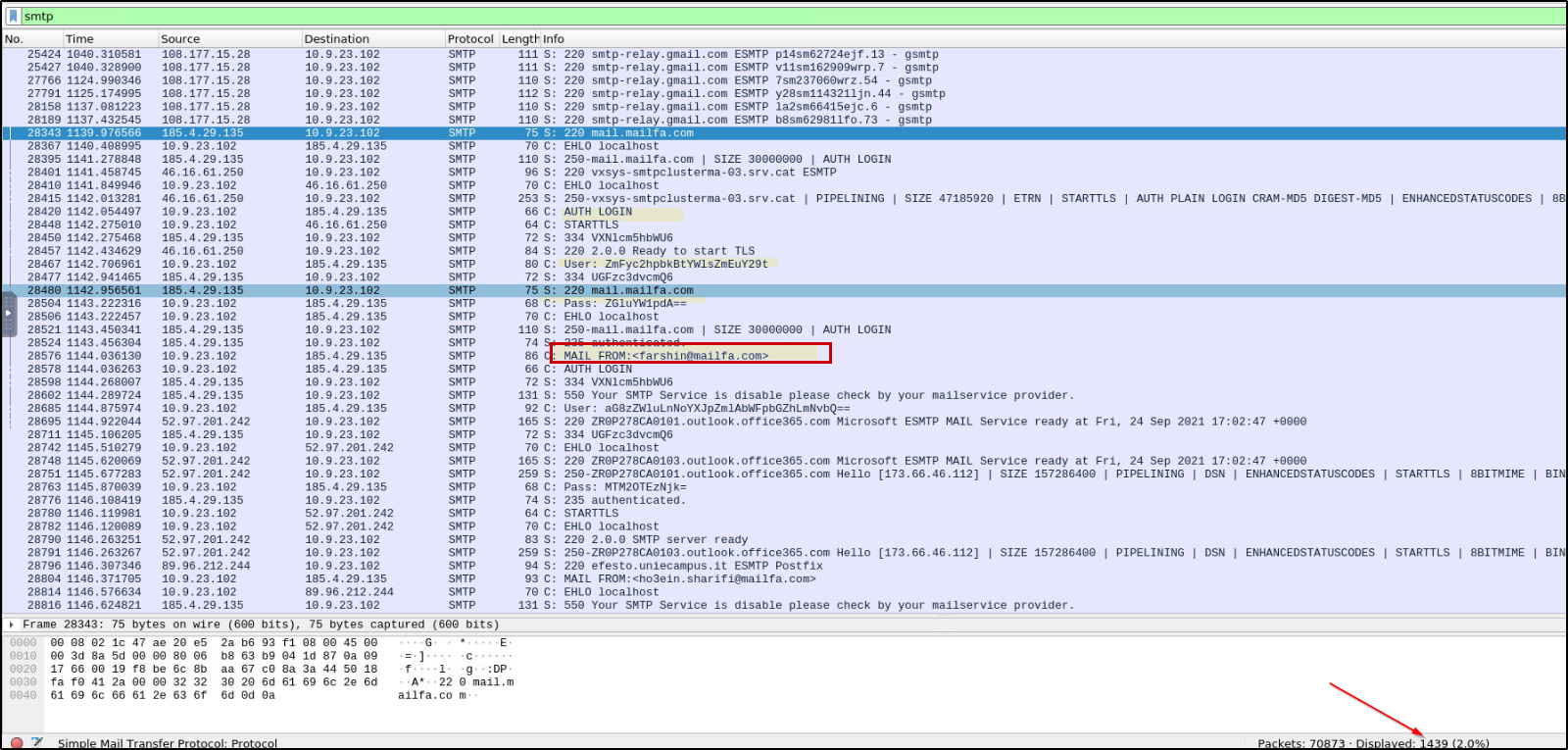
By applying the filter smtp, I observed SMTP traffic and identified the first login to the SMTP server 185.4.29.135. After following the TCP stream, I found that the first MAIL FROM address
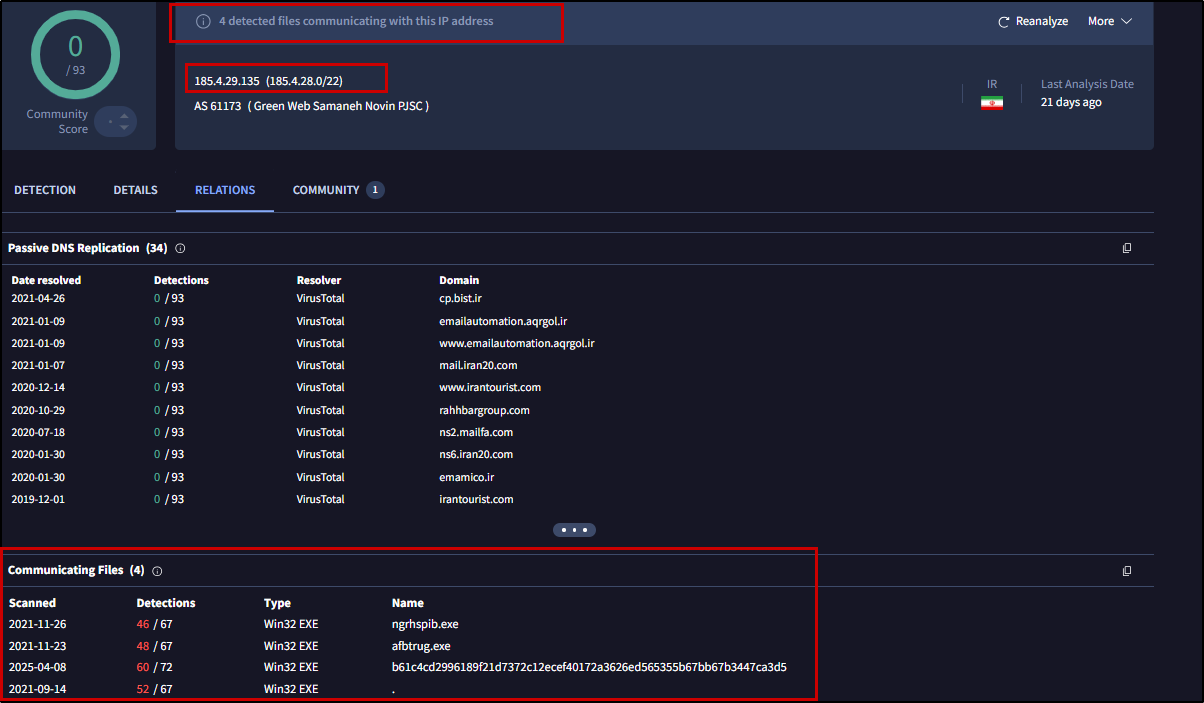
Even though the SMTP server IP is not flagged as malicious on VirusTotal,
VirusTotal shows that 4 malicious files are reported as communicating with this IP.
- How many packets were observed for the SMTP traffic?
Ans: 1439 SMTP packets.
(Refer to the screenshot above for confirmation.)
Extra Info:
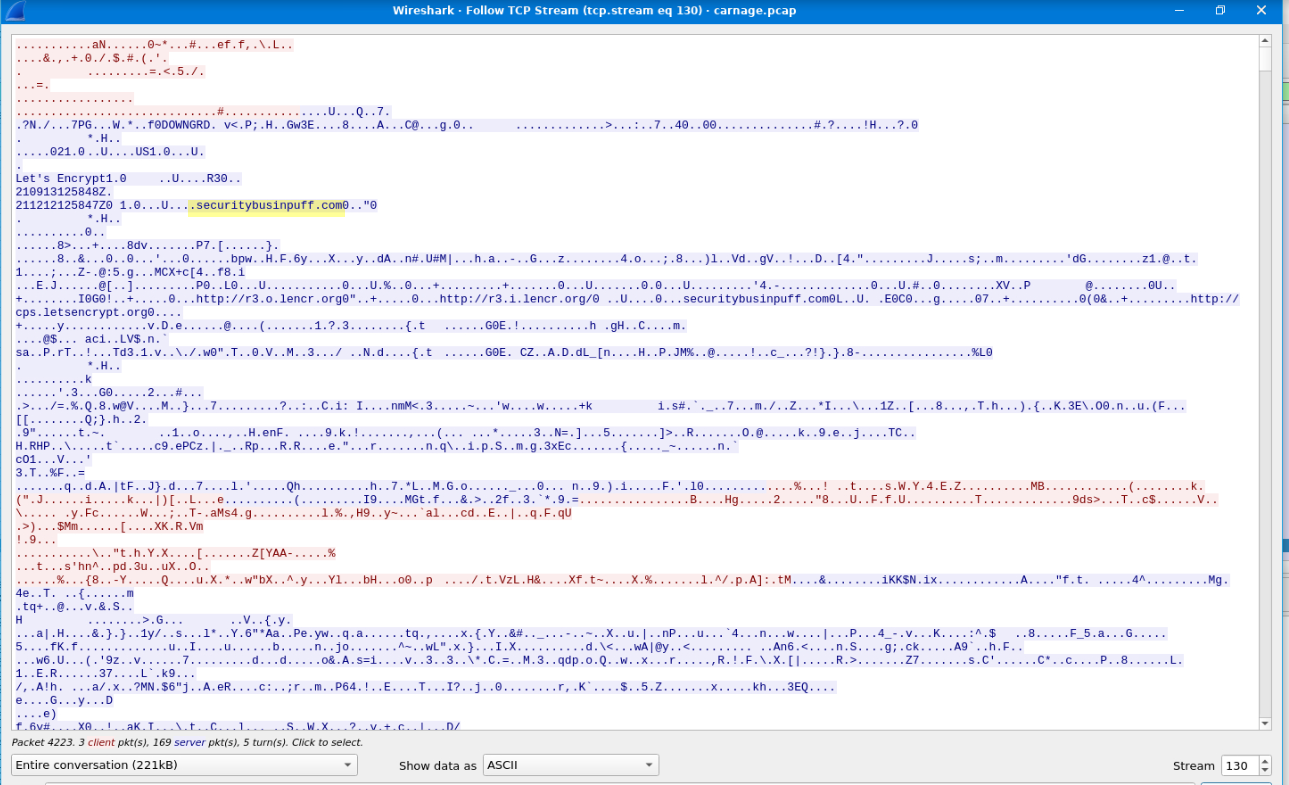
After the GET and POST C2 activity, I observed continuous TCP connections from the malicious IP to the internal host. This traffic is not HTTP, and even after following the TCP stream, I could see large amounts of raw TCP data being exchanged.
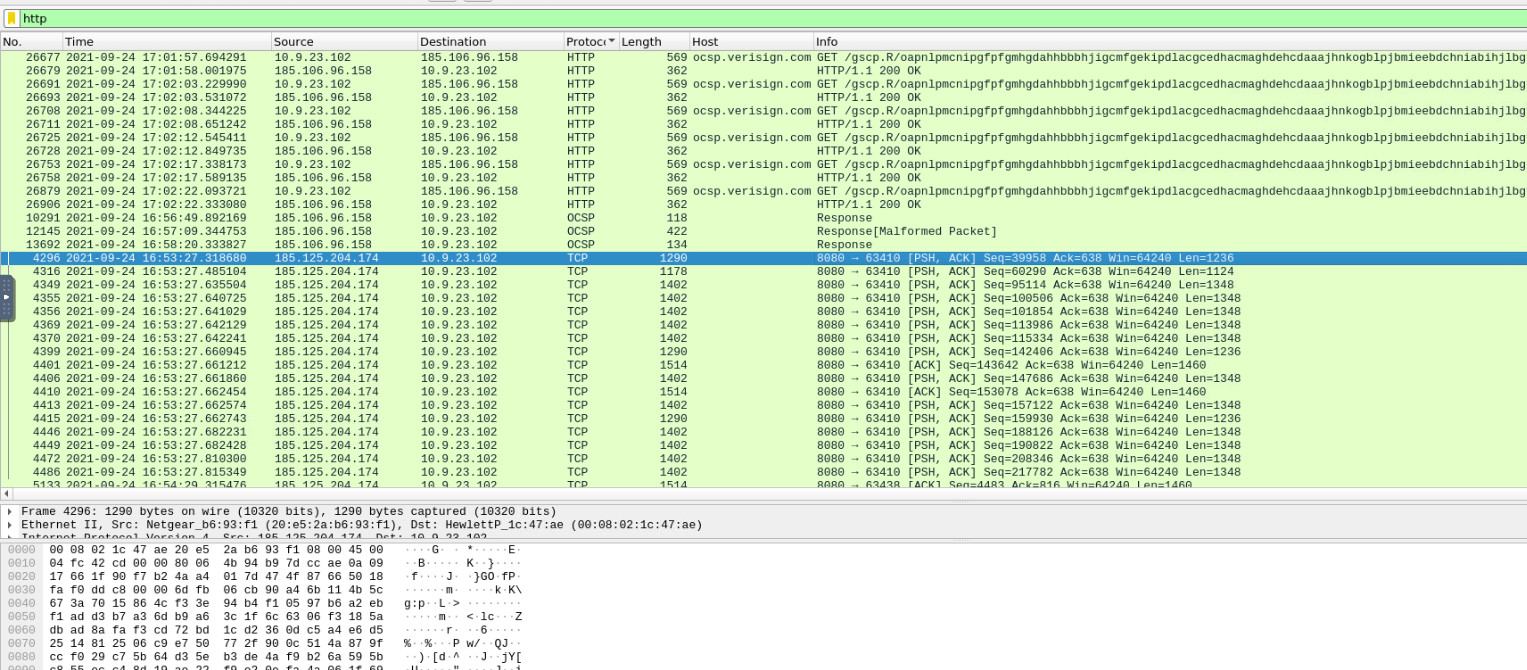
While inspecting this raw TCP data, I noticed the domain name securitybusinpuff.com, which matches the second Cobalt Strike server domain confirmed in VirusTotal above.
Thank you for reading. I hope you enjoyed this walkthrough.
Keep Hunting!
About the author
- 👋Hi, I’m Umamaheswari Through this blog, I share visual walkthroughs and hands-on investigations on PCAP, phishing, Splunk, ELK, malware, and digital forensics—based on labs from TryHackMe, HackTheBox and CyberDefenders. Feel free to connect or ask questions — I am more happy to help.
Comments
Join the discussionNo comments yet. Be the first to comment.


